

Guide of Free Pomodoro Focus Timer
Stay focused with our free Pomodoro Focus Timer. Customize work and break intervals, organize tasks, and track daily focus progress where supported.
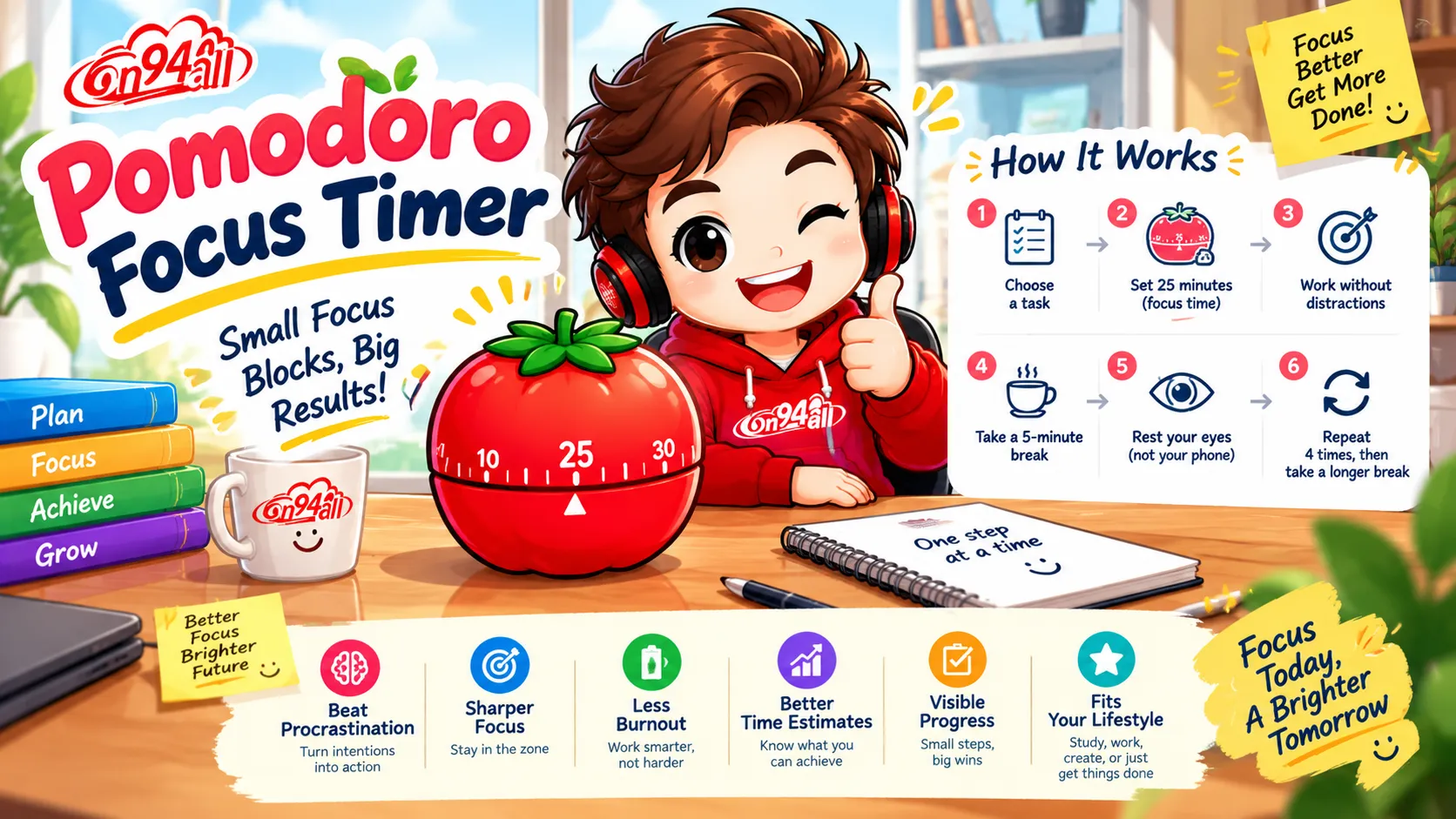
Free Pomodoro Focus Timer – Stay Focused, Work Smarter & Take Better Breaks
Having trouble staying focused while studying or working? Get more done with our Free Pomodoro Focus Timer, a simple online productivity tool that helps you concentrate on one task at a time.
Focus for a while, take a short break, and repeat. Whether you're a student preparing for exams, an office worker managing deadlines, or a freelancer working from home, the Pomodoro technique can help you build a more consistent work routine.
🍅 What Is the Pomodoro Technique?
⏱️ Set your timer, choose your task, and start focusing — all for free!
The Pomodoro Technique is a time-management method that breaks work into focused intervals separated by short breaks.
The traditional approach uses:
The word "Pomodoro" means tomato in Italian. The method is named after the tomato-shaped kitchen timer used by its creator.
The idea is simple: instead of trying to concentrate for hours without stopping, you work in manageable intervals and give yourself regular opportunities to rest.
You can also adjust the intervals to suit your needs. Some people prefer 25 minutes of focus, while others work better with 45- or 50-minute sessions.
The traditional approach uses:
- 25 minutes of focused work
- 5 minutes of short break
- Repeat the cycle four times.
- Take a longer break of around 15–30 minutes after four focus sessions.
The word "Pomodoro" means tomato in Italian. The method is named after the tomato-shaped kitchen timer used by its creator.
The idea is simple: instead of trying to concentrate for hours without stopping, you work in manageable intervals and give yourself regular opportunities to rest.
You can also adjust the intervals to suit your needs. Some people prefer 25 minutes of focus, while others work better with 45- or 50-minute sessions.

🚀 Why Use Our Free Pomodoro Focus Timer?
Our online Pomodoro timer helps you organize your work sessions without needing complicated productivity software.
Choose one task and dedicate your focus session to completing it.
Instead of switching constantly between emails, social media, messages, and other distractions, give yourself a clear period to work on the task in front of you.
Perfect for:
Working continuously for long periods can feel exhausting.
Short breaks give you an opportunity to stretch, drink water, rest your eyes, or simply step away from your screen.
When your focus session ends, take your scheduled break before starting another session.
Remember: Breaks are part of the process, not a waste of time.
Everyone has different concentration needs.
Some people prefer short, manageable sessions, while others need longer blocks for deep work.
If supported by your timer, customize your focus and break durations to match your schedule.
For example:
Experiment with different intervals to find a routine that works for you.
A task list helps you decide what deserves your attention before the timer starts.
Write down the tasks you want to complete and select one to work on during each focus session.
For example:
☐ Complete mathematics exercises
☐ Read 20 pages of a textbook
☐ Finish a work presentation
☐ Reply to important emails
☐ Review today's notes
Breaking large projects into smaller tasks makes it easier to get started and track your progress.
Task-list functionality depends on the features available in your version of the timer.
Understanding how you spend your time can help you build better habits.
If your timer includes daily focus statistics, use them to review your completed sessions and total focus time.
For example, you might discover that you completed six focus sessions today.
At 25 minutes per session, that represents:
6 × 25 minutes = 150 minutes of focused work.
That's two and a half hours dedicated to meaningful tasks, excluding breaks.
Over time, reviewing your progress may help you identify productive routines and set realistic goals.
Daily statistics and session history depend on the features provided by the tool.
⏱️ 1. Focus on One Task at a Time
Choose one task and dedicate your focus session to completing it.
Instead of switching constantly between emails, social media, messages, and other distractions, give yourself a clear period to work on the task in front of you.
Perfect for:
- Studying for exams
- Writing reports
- Completing assignments
- Programming and coding
- Reading books
- Managing office tasks
☕ 2. Take Regular Breaks
Working continuously for long periods can feel exhausting.
Short breaks give you an opportunity to stretch, drink water, rest your eyes, or simply step away from your screen.
When your focus session ends, take your scheduled break before starting another session.
Remember: Breaks are part of the process, not a waste of time.
⚙️ 3. Customize Your Focus Time
Everyone has different concentration needs.
Some people prefer short, manageable sessions, while others need longer blocks for deep work.
If supported by your timer, customize your focus and break durations to match your schedule.
For example:
- 25/5: 25 minutes of focus and 5 minutes of rest.
- 30/5: 30 minutes of focus and 5 minutes of rest.
- 45/10: 45 minutes of focus and 10 minutes of rest.
- 50/10: 50 minutes of focus and 10 minutes of rest.
Experiment with different intervals to find a routine that works for you.
📝 4. Organize Your Tasks with a Task List
A task list helps you decide what deserves your attention before the timer starts.
Write down the tasks you want to complete and select one to work on during each focus session.
For example:
☐ Complete mathematics exercises
☐ Read 20 pages of a textbook
☐ Finish a work presentation
☐ Reply to important emails
☐ Review today's notes
Breaking large projects into smaller tasks makes it easier to get started and track your progress.
Task-list functionality depends on the features available in your version of the timer.
📊 5. Track Your Daily Focus Progress
Understanding how you spend your time can help you build better habits.
If your timer includes daily focus statistics, use them to review your completed sessions and total focus time.
For example, you might discover that you completed six focus sessions today.
At 25 minutes per session, that represents:
6 × 25 minutes = 150 minutes of focused work.
That's two and a half hours dedicated to meaningful tasks, excluding breaks.
Over time, reviewing your progress may help you identify productive routines and set realistic goals.
Daily statistics and session history depend on the features provided by the tool.
🛠️ How to Use a Pomodoro Focus Timer in 4 Simple Steps
Getting started is easy.
Decide what you want to accomplish.
Instead of writing "study mathematics," choose a specific goal such as "complete exercises 1–10."
A clear task makes it easier to begin.
Choose a focus interval that suits your task.
If you're new to the Pomodoro Technique, start with 25 minutes of work followed by a 5-minute break.
Adjust the duration if you find that a different interval works better for you.
Begin your session and work on your chosen task.
Put your phone away, close unnecessary browser tabs, and silence nonessential notifications.
If another task comes to mind, write it down for later instead of immediately switching away from your current work.
When the focus session ends, take a short break.
Stretch, walk around, drink some water, or rest your eyes.
Then start your next session and continue working through your task list.
After several focus sessions, take a longer break if needed.
That's it! Small, focused sessions can help you build a more productive routine.
Step 1: Choose Your Task
Decide what you want to accomplish.
Instead of writing "study mathematics," choose a specific goal such as "complete exercises 1–10."
A clear task makes it easier to begin.
Step 2: Set Your Focus Duration
Choose a focus interval that suits your task.
If you're new to the Pomodoro Technique, start with 25 minutes of work followed by a 5-minute break.
Adjust the duration if you find that a different interval works better for you.
Step 3: Start the Timer and Focus
Begin your session and work on your chosen task.
Put your phone away, close unnecessary browser tabs, and silence nonessential notifications.
If another task comes to mind, write it down for later instead of immediately switching away from your current work.
Step 4: Take a Break and Repeat
When the focus session ends, take a short break.
Stretch, walk around, drink some water, or rest your eyes.
Then start your next session and continue working through your task list.
After several focus sessions, take a longer break if needed.
That's it! Small, focused sessions can help you build a more productive routine.
🎯 Who Can Benefit from a Pomodoro Timer?
The Pomodoro Technique can be adapted to many different activities.
🎓 Students
Use focus sessions to revise subjects, complete assignments, practice mathematics, or prepare for examinations.
For example, a student could complete three 25-minute study sessions with short breaks between them.
💻 Office Workers
Break large projects into manageable blocks of work.
Use the timer to concentrate on writing reports, preparing presentations, reviewing documents, or completing administrative tasks.
👨💻 Programmers and Developers
Dedicate individual sessions to coding, debugging, reviewing code, or learning a new programming language.
Short breaks can also provide an opportunity to step back and reconsider a difficult problem.
🏠 Remote Workers and Freelancers
Working from home can introduce distractions from household chores, social media, and personal errands.
A timer helps create a clearer boundary between focused work and break time.
🎨 Creators and Content Writers
Use focus sessions to write articles, design graphics, edit videos, plan social media posts, or develop creative projects.
A simple timer can make it easier to begin a task instead of waiting for inspiration.
🏃 Everyday Personal Tasks
The technique isn't limited to office work.
Try using it to organize household chores, read a book, learn a language, practice an instrument, or work on a personal project.
💡 7 Tips to Get Better Results with the Pomodoro Technique
1. Start with one clear goal.
Know what you want to accomplish before starting the timer.
2. Remove unnecessary distractions.
Silence nonessential notifications and close unrelated tabs.
3. Make your tasks manageable.
Break large projects into smaller activities that can be completed across several sessions.
4. Respect your breaks.
Use breaks to move around and rest rather than immediately replacing work with another demanding activity.
5. Avoid chasing perfect productivity.
Some sessions will be more productive than others. Focus on building a sustainable routine.
6. Adjust your timer when necessary.
The traditional 25/5 schedule is a starting point, not a rule that everyone must follow.
7. Review your progress.
If daily statistics are available, look at your completed sessions and set a realistic goal for tomorrow.
❓ Frequently Asked Questions
1. Is the Pomodoro Focus Timer free?
This tool is designed to provide an easy way to manage focus sessions online. Check the website for the current features, usage limits, and any optional paid plans.
2. What is the best Pomodoro timer setting?
The traditional starting point is 25 minutes of work followed by a 5-minute break. However, the best duration depends on the task, your concentration, and your personal preferences.
3. How many Pomodoro sessions should I complete each day?
There is no universal target. Start with a few sessions and increase them gradually if your schedule allows. The goal is consistent, sustainable work rather than maximizing the number of sessions.
4. Can I use the Pomodoro Technique for studying?
Yes. You can divide study time into focused sessions dedicated to reading, revision, practice questions, or memorization.
5. Can I customize focus and break durations?
If your timer supports custom durations, you can adjust the intervals to suit your working style.
6. Does the Pomodoro Technique work for everyone?
Not necessarily. Some people enjoy structured work intervals, while others prefer longer uninterrupted periods. Try the technique and adjust it according to your needs.
7. Do I need to install an application?
If the timer runs directly in your browser, you can use it without installing a separate application. Availability depends on your website's implementation.
8. Can a Pomodoro timer help prevent burnout?
Regular breaks may help you manage demanding work more sustainably, but a timer alone cannot prevent burnout. Adequate sleep, reasonable workloads, recovery time, and healthy working conditions are also important.
🚀 Ready to Focus?
Stop waiting for the perfect moment to get started.
Choose a task, set your focus duration, and begin with one manageable session.
Whether you're studying for an important examination, finishing a project, or building a new habit, our Free Pomodoro Focus Timer can help you organize your time one session at a time.
⏱️ Focus for a while. Take a short break. Repeat.
👉 Try Our Free Pomodoro Focus Timer Today!